
A key part of ranking higher in Google is optimizing your website’s images. Many businesses focus on text, but images also offer opportunities to rank higher in search results. Especially if you offer a visual product or service, your images are important not only for your appearance but also for your SEO!
In this blog we give you 3 tips that you can easily apply yourself.
1: Choose the correct file type
Your website’s loading speed is a key factor for search engines. To make your website faster, it’s important to have the right image file type. Uploading your images in the correct file type ensures your website loads faster.
To give you a good overview, we’ve listed the three most commonly used file types. This way, you can see which file types are best for your images:
| File types | JPEG | PNG |
| Transparent background | No | Yes |
| File size | Small | Large |
| Recommended for | Photography, large images, colorful images | Logos, screenshots, graphs, images with text |
All images you upload to Webador are automatically converted to WebP format by our system, guaranteeing the best loading times.
2: Add ALT text
The second tip is to add alternative text to your images, also called “alt text.” Alt text is often added for visually impaired users, but it also helps search engines better understand your images. Google can’t “see” your image; it only reads the alt text. So if you don’t have that text, Google won’t understand what your image is about.
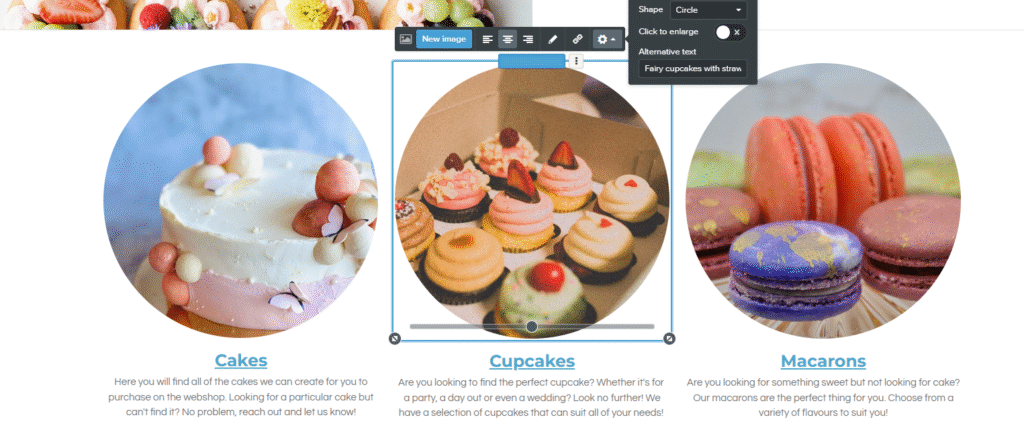
Adding ALT text to your website is super easy, just follow these steps:
- Go to the image for which you want to set alt text and click on the image:
- Click on the gear:
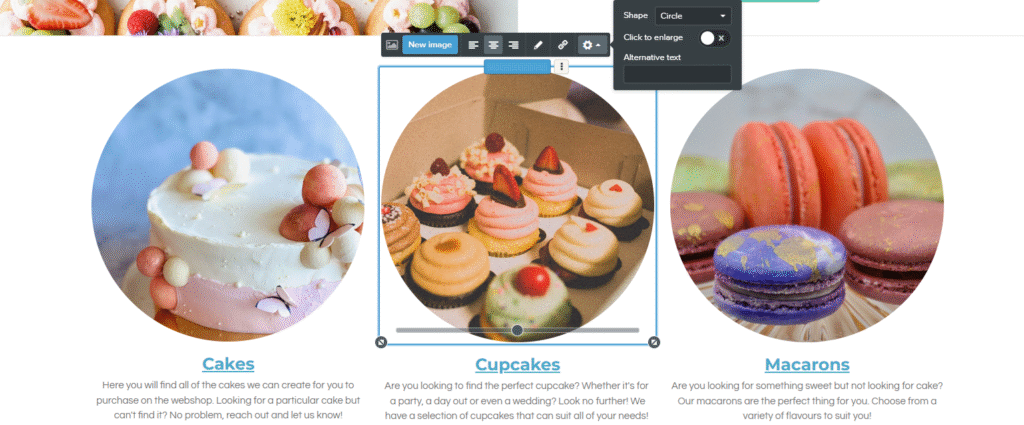
3. A pop-up window will appear with “Alternative Text.” Enter your text here. Briefly describe what your image is about:
3: Change your file name
The third tip for optimizing your images is to change your file name.
Chances are, the image you want to upload to your website has an unusual file name. A valuable tip to make your images easier to find is to change the file name before uploading them.
Conclusion
These are the 3 most important tips for optimizing your images. By choosing the right file type, adding ALT text, and adjusting the file name, you’ll ensure your images rank higher in search engines.




Great data to know thanks 😊
Hi Eleven, thank you for your lovely comment! We are glad to hear you enjoyed the blog. The Webador team. ✨
Completely forgot about the alt text for images! Thank you so much for reminding me 😊
Hi, thank you for your comment. We are glad you found this blog useful! The Webador team!