
Creating your own website is a fun first step for your business. You choose a design, write your copy, add photos, and before you know it, your website is online! However, there are a number of pitfalls that starting entrepreneurs encounter. Don’t worry, because making mistakes is part of the process. But why make them when you can prevent them?
In this blog, we share the 10 most common mistakes and how to avoid them. This way, you get the most out of your website right from the start!
1. A domain name that is too long or complicated
Your domain name is your business’s online address and often one of the first choices you have to make. It is therefore important to think carefully about it. A good domain name is short, easy to remember, and simple to type. Avoid difficult spelling, long combinations, and unnecessary numbers or punctuation marks. The simpler, the better.
Ask yourself the question: can someone remember my domain name if I only mention it once?
2. Log in with a business email address
This is one of the most common pitfalls! Suppose you are a baker and have a business email address . It seems logical to use this email to log in to Webador as well. However, this can cause problems if your domain name or website is temporarily unavailable.
Your mailbox is linked to your domain name, so if your domain name is down, your mailbox won’t work either, and if you need to recover your password at that exact moment, you won’t be able to receive the recovery email!
Therefore, use a personal email address for your Webador account that you always have access to. You can then use your business email for communication with your customers.
3. You forget to publish your website
You’ve worked hard on your website and are completely satisfied with the end result. Time to send the link to your friends and family! But wait… they can’t see your website? How is this possible?!
Conclusion: your website is not yet published. Don’t forget to click the ‘publish’ button in the top right of the editor . Only then will your website be visible to others.

4. Too much information in the footer
The footer is the bottom of your website. Because it appears on every page of your website, it can be tempting to put all kinds of information in it, but an overcrowded footer actually makes your website look cluttered. Think carefully about what a visitor actually needs.
Therefore, use the footer for information that is relevant on multiple pages. Think of your contact details, social media channels, terms and conditions, and company details.
5. The receiving address of your contact form
When you add a contact form to your website, the system automatically uses the email address you are logged in with to Webador. Do you want customer inquiries to arrive in your business email? Then manually adjust the recipient address in the contact form settings.
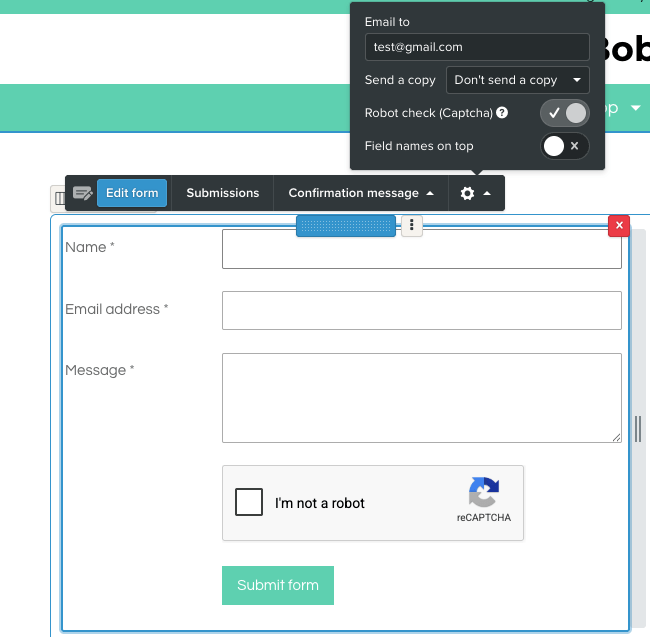
💡TIP: Test your contact form before sharing your website. Fill out the form yourself and check if the email arrives correctly. This way, you avoid missing an important customer inquiry.
6. Not checking the mobile views
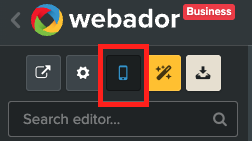
Your website might look great on a computer screen, but how does it look on your smartphone? About 52% view your website on mobile, so this is at least as important. JouwWeb uses responsive designs, so your website automatically adapts to the screen on which it is viewed. Nevertheless, it is smart to regularly check the mobile version yourself.
In the Editor, you can easily switch to the mobile view and view your website from a smartphone perspective:
7. An overcrowded menu
It might sound logical to give every page a place in your menu, but for your visitor, this can actually be confusing. The more choices you provide, the harder it becomes to find something quickly. Therefore, start with a simple structure, such as:
- Home
- About us
- Services / Webshop
- Contact
Do you need more information? Then you can always further expand the pages with subpages .
8. The expectation that you will immediately appear at the top of Google
You have published your website and, naturally, you immediately search for your company name on Google, but you aren’t appearing yet?!
Don’t panic. It is normal for a new website not to appear high in the search results immediately. Google needs to discover your website and index the pages first. Even if your website is indexed, it doesn’t automatically mean you will be at the top right away!
SEO is a process that requires time and attention. Do you want to improve your visibility? Then make sure you write clear copy and incorporate your keywords into it.
Do you have a Business package? Then we also recommend linking your website to Google Search Console to gain more insight into your visibility.
9. Multiple accounts
Have you lost your login details? It can be tempting to simply create a new account. However, that is not the most convenient solution. This can result in multiple accounts, meaning you won’t know which account belongs to which website later on. Therefore, always try to use one main account for your website.
Are you having trouble logging in? Then use the option to reset your password . Still having trouble? Then you can of course contact us via support@webador.com
10. You are unaware of our socials!
You might build a website yourself, but that doesn’t mean you have to figure everything out on your own. In our help center, you will find extensive explanations and step-by-step guides on a wide range of topics. From setting up your domain name and customizing your design, to your webshop and connecting external tools!
Do you prefer watching videos? Then check out our YouTube channel , where you will find practical instructional videos. Think of videos about SEO, webshops, and external tools.
Of course, we also share new tips, inspiration, and updates daily via Instagram and Facebook !