Starting a website can feel overwhelming. You may have an idea on how you would like your site to look like, but not know where to begin.
What should you write? Which pages do you need? How should your website be structured? What if it does not look professional enough?
The good news is that you do not need to create everything perfectly from the start. With Webador AI, you can build your website step by step, one page at a time.
Webador AI helps you create individual pages by asking a few simple questions about your page, your audience, and your goal. This means you can slowly turn your idea into a complete website without starting from a blank screen.
In this guide, you will learn how to use Webador AI to create the main pages of your website, how to best answer the AI questions, and how to build a stronger website from the beginning.
Why build your website one page at a time?
Many beginners make the same mistake: they try to build the whole website at once. This can quickly become confusing. You may start thinking about the homepage, services, contact information, images, text, design, and layout all at the same time.
A better approach this is to build your website one page at a time.
You can use our AI feature to create one page at a time, which can actually help you stay focused. This gives each page a clear purpose and step by step, you will build a full website.
Below, we share 6 steps on how you can use Webador’s AI page by page feature to support you in building your website.
Step 1: Decide which pages your website needs:
Before jumping straight in to using AI, think about the basic structure of your website. Start with the most important pages you feel you and your visitors will need.
For example, you can start with:
- a homepage
- an about page
- a service page
- a product page
- a contact page
💡Tip: You can always add more pages later. The goal is to create a clear first version that helps your visitors understand your business.
Step 2: Give every page one clear goal
Each page on your website should have one main purpose.
Before using Webador AI, ask yourself:
- What is this page about?
- Who is this page for?
- What should visitors do after reading it?
You want to make sure your website is clear and concise when people visit it. For example:
A homepage should quickly explain what your website is about.
An about page should build trust.
This helps Webador AI create a page that feels more focused and useful.
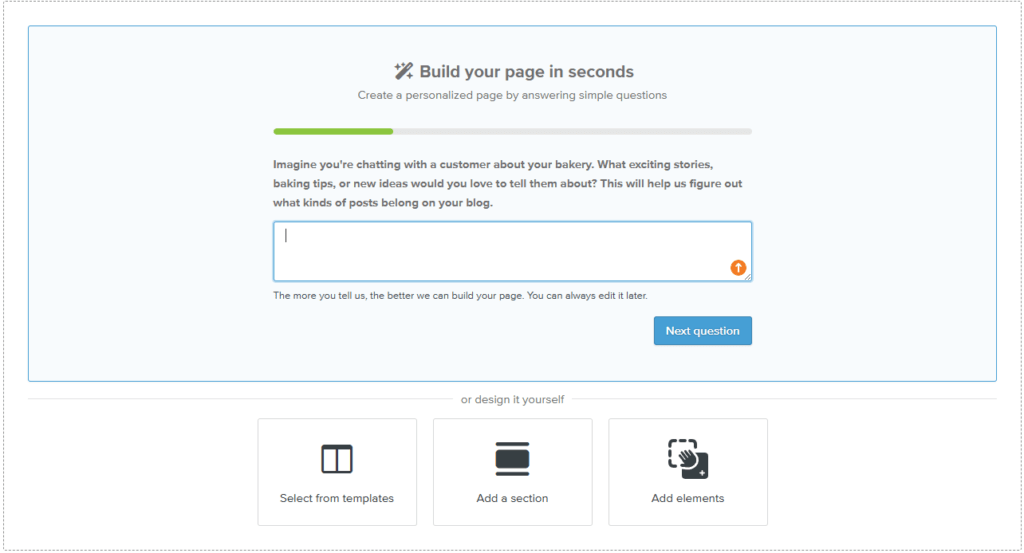
Step 3: Use Webador AI page by page:
Using our AI feature to build your website one page at a time can be useful as every page has a different role.
Using this feature keeps each page to the point. Think about the answers you give for your homepage. They should not be the same as the answer you give for your contact page. You want to make sure each page shows it’s own purpose.
The questions the AI tool will ask are very similar to what you have though about in Step 2 which is why it is good to think about this before jumping straight in. Since you have though about these already, it will be easier when starting to use the AI feature.
Using this, you want to make sure the answers you give provide enough information.
Instead of saying:
“I need a page for my business.”
Try to say:
“I need a homepage for my freelance photography business that introduces my services and encourages visitors to book a photoshoot.”
The clearer your goal is, the better the AI result will be. If you answer clearly, this can create a more relevant and professional starting point. If your answers are too vague, the page may feel generic.
Step 4: Repeat the Process for each page
Once your first page is created, you can repeat the same process for the next page.You want to make sure the focus of each page will be displayed correctly.
For example:
Homepage
Goal: explain who you are and what you offer.
Visitor action: continue exploring or contact you.
About page
Goal: tell your story and build trust.
Visitor action: understand why they should choose you.
Services page
Goal: explain your services clearly.
Visitor action: choose a service or request more information.
Contact page
Goal: make communication easy.
Visitor action: send a message, book, call, or request a quote.
By creating each page separately, your website becomes more organized. Each page has its own purpose, but together they create one complete website.
Step 5: Review and personalize each page
Webador AI gives you a strong starting point, but you should always review the result.
Before saving or publishing a page, ask yourself:
- Does this sound like me or my brand?
- Is the information correct?
- Is the message clear?
- Is the page useful for visitors?
- Is the call to action easy to understand?
You do not need to rewrite everything. Small edits can already make the page much better.
You can:
- add your personal tone
- remove sentences that feel too generic
- add specific details about your business
- improve the call to action
- make the page sound more natural
- check if the page matches the rest of your website
AI gives you speed and structure, but your personal input makes the website feel real and trustworthy.
Step 6: Build first, improve later
It is common for beginners to hesitate to share their work, waiting for the website to be completely flawless.
However, an initial launch does not require perfection. It simply needs to clearly communicate four essential elements to your visitors:
- who you are
- what you offer
- why it matters
- what they should do next
Once your pages are created, you can continue improving them.
You can later:
- add images
- add more pages
- improve SEO
- add customer reviews
The most important step is to move from idea to action.
A simple website that is ready to improve is better than a perfect website that never gets created.
Conclusion:
Creating a website does not have to be complicated.
With Webador AI, you can start with a simple idea and build your website step by step. The tool helps you create one page at a time, which makes the process easier, clearer, and less overwhelming.
Start with the most important pages. Give each page one clear goal. Answer the AI questions with specific details. Then review, personalize, and improve your website over time.
Your first website is not about perfection.
It is about getting started.